Paper business cards are easy to lose and quickly go out of date. NFC business cards solve both problems: one tap on a smartphone opens your digital profile with your contact details, links and portfolio — ready to save in seconds.
Here is everything Saudi professionals and businesses need to know before ordering.
What is an NFC business card?
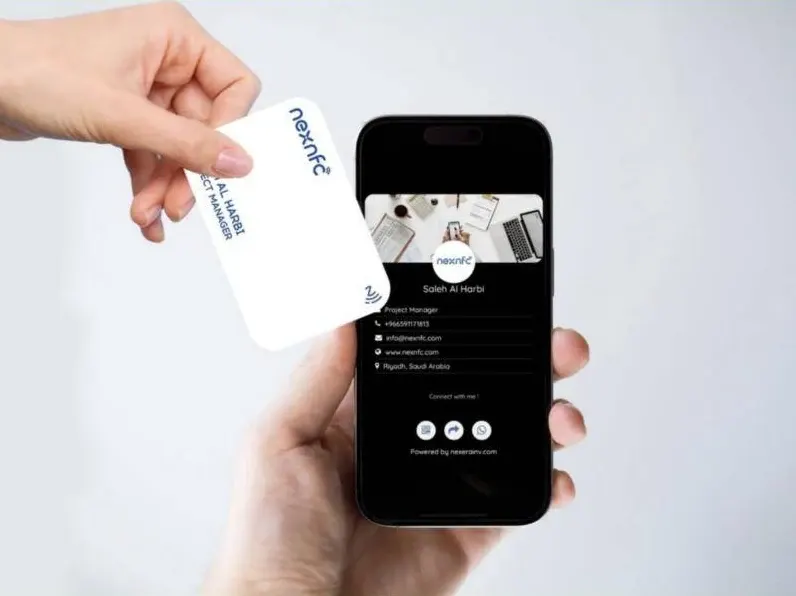
An NFC business card looks like a premium printed card but contains a tiny NFC chip (Near Field Communication). The chip stores a link to your digital profile. When someone holds their phone near the card, the phone reads the link and opens your profile — no app required.
Most cards also carry a QR code, so anyone can scan it with their camera if their phone does not support NFC or has it switched off.
How do NFC business cards work?
- Tap. The other person holds their smartphone near your card.
- Share. Their phone opens your personalised digital profile instantly in the browser.
- Save. They save your contact with one button, or open your WhatsApp, LinkedIn, website or location.
- Update. You change your details any time from your dashboard — the card never needs reprinting.
The chips used in business cards (such as NTAG215 or NTAG216) work at 13.56 MHz and only respond at a distance of a few centimetres, so sharing is always intentional.
Which phones support NFC cards?
- iPhone: iPhone XS and newer read NFC tags automatically in the background — just hold the top of the phone near the card.
- Android: most modern Android phones support NFC; it may need to be switched on in settings.
- Any phone: the printed QR code works with any smartphone camera.
Why Saudi businesses are switching to NFC cards
- A modern first impression at meetings, exhibitions and events.
- Always up to date — new title, new number, new office? Update once, and every card is current.
- Cost-effective — no reprinting every time something changes.
- Paperless — less waste, which supports sustainability goals.
- Measurable — see how often your card is tapped and which links get clicked.
- Team-ready — manage every employee’s card and profile from one dashboard, with consistent branding.
Types of NFC products
NFC is not only for business cards. Popular options in Saudi Arabia include:
- NFC business cards in finishes such as natural wood, matte black and classic white.
- Google Review cards that open your Google review page with one tap — ideal for restaurants, clinics and retail.
- NFC tags and stickers for tables, counters, products and posters.
- Dual-chip cards that combine a business card with a 125 kHz door-access chip.
- RFID door access cards for offices and buildings.
- Apple Wallet business cards you can share straight from your phone.
- NFC coins, card sleeves and ID badges.
What to put on your digital profile
Keep it focused: your name and photo, job title and company, phone and WhatsApp, email, website, LinkedIn and other social links, your office location and a “Save contact” button. For Saudi audiences, offer the profile in Arabic and English.
How to choose an NFC card provider
- Does the profile work in Arabic and English, with a proper right-to-left layout?
- Can you edit your details yourself, at any time, without extra fees?
- Is there a QR code backup on every card?
- Can you manage a whole team from one dashboard?
- Is the print and material quality right for your brand?
- Is there local support in Saudi Arabia?
How to order from NexNFC
NexNFC is the NFC company of Nexera Innovation, trusted by organisations such as KAFD, Naqua, Banque Saudi Fransi, Burj Al Hamam and ArcelorMittal. Ordering takes four steps:
- Choose your card type and material.
- Share your details — name, title, links and logo.
- Approve the design of your card and digital profile.
- Receive your cards, ready to tap.
Explore our NFC solutions, visit nexnfc.com or book a free strategy session to plan cards for your whole team.